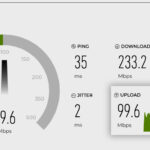
Curious how fast your connection really is?
Click the GO button to run a quick speed test and see your download/upload speed results instantly.
Speed Test — How Fast is Your Internet Connection?
The connection you have shapes the experience you get.
Ever notice how some websites pop right open while others seem to crawl? A big piece of that comes down to your internet connection speed. Simply put, connection speed is how quickly data can travel between your device and the web.
At home, a fast connection means smooth streaming, quick downloads, and video calls without that dreaded lag. For businesses, it means reliable workflows, cloud apps that don’t hang, and happy customers on Wi-Fi. On mobile, it’s the difference between a page loading instantly while you’re on the go—or you giving up before it even finishes.
How a Speed Test Works
Services like Ookla’s Speedtest (see my custom version above) give you a snapshot of your current connection. When you run a test, the service pings a nearby server, sends and receives data, and measures:
- Download speed — how fast you can pull information down from the internet (streaming, browsing, downloading files).
- Upload speed — how fast you can send information back out (video calls, sending email attachments, uploading files).
- Latency (ping) — how long it takes for data to travel back and forth, measured in milliseconds.
Those three numbers tell you a lot about why your internet feels fast—or frustrating.
Average Internet Speeds
To put it in perspective, here’s what “fast” and “slow” can really mean in numbers:
- Dial-up (old school): 56 kbps — basically unusable today, pages can take minutes to load.
- Slow connections: 1–5 Mbps — basic browsing and email, but streaming video or large downloads struggle.
- Mobile data: 10–50 Mbps — varies widely depending on coverage; usually good for video and everyday use.
- Broadband / high-speed internet: 100–500 Mbps — smooth streaming, gaming, video calls, and fast downloads/uploads.
- Gigabit fiber: 1,000 Mbps (1 Gbps) or more — near-instant downloads, seamless cloud work, and plenty of bandwidth to share.
Knowing where your connection falls in this range can help explain why some sites feel snappy while others lag behind.
Check your Internet Speed Now: Hit the GO button above and watch the numbers fly—your download, upload, and ping, all measured in real time. Then compare to the info above.
Download vs. Upload Speeds
Don’t worry if you notice your upload speed is much slower than your download speed—that’s totally normal. Most internet plans are designed this way because everyday use leans heavily on downloads: watching videos, streaming music, browsing websites, or downloading files.
Uploads matter too, but unless you’re regularly sending large files, live-streaming, or backing up data to the cloud, you won’t notice the slower number much.
The exception? Newer technologies like Fiber Optic connections. With some modern services, you often get symmetrical speeds—meaning your uploads are just as fast as your downloads. That’s a big advantage for people who work remotely, create content, or need to move a lot of data both ways.
Websites: Why Speed Matters
Here’s the thing: not everyone browsing your site is on a speedy home connection. Some are on spotty Wi-Fi at a café. Some are on a phone with one bar. Some are working in an office with overloaded shared bandwidth.
If your site is bloated with oversized images, heavy scripts, or slow servers, those visitors are going to feel it. And if it takes more than a few seconds to load, many won’t stick around.
How I Build for Speed
At Get Kenneth, performance isn’t an afterthought—it’s built in. I use proven tools, smart caching, and lean code so your site loads quickly across devices and connection types. The result is a better experience for every visitor, whether they’re on gigabit fiber or a sluggish cell signal.
A fast website respects your visitors’ time and earns their trust. And that’s exactly what I deliver.